Tuesday, August 7, 2007

Screening + discussion: “My Architect: A Son’s Journey,” 2003, Dir. Nathaniel Kahn


http://www.myarchitectfilm.com

Questions and Notes for Discussion

Take note of Kahn’s drawings – some of them are very rough, and not all that “draughtsman-like” yet they capture the basic structure of buildings, light and space.

Motif - (pronounced mo-teef) - A French term which refers to: the subject matter or content of a work of art (e.g., a landscape motif); also refers to a visual element used in a work of art, as in a recurring motif (i.e., Warhol used the motif of soup cans in his early works; or Mondrian used rectangles as a visual motif). Much of Kahn’s architecture uses recurring motifs of simple geometric shapes: circles, squares, and triangles. Why do you think this is?

Kahn believed in “the truth of materials.” There is a passage in the film where he describes the beginnings of his working process by talking to a brick, and asking the brick what it wants to be. What do you think this means, and how does it help us understand his thought process?

Louis Kahn built very few buildings in his career, yet he was considered a great architect and a true artist. I. M. Pei, another great architect who was commercial success, felt that he was not an artistic success. What is artistic success, and are these 2 kinds of success incompatible?

Artists are often stereotyped as temperamental, difficult to work with, and (if they are male) womanizers. This seems to have been the case with Kahn, as well as artists like Pablo Picasso, Jackson Pollock, and even Michelangelo. Does an artist’s social behavior affect the way you view their work? Is biography important?

Tuesday, July 31, 2007

Guerilla Art/Design Projects

Mobility Mapping
Tripwire
Adart
Shiv Card
The Surveillance Camera Players
Guerilla Programming of Video Surveillance Equipment Manifesto
New York Civil Liberties Union

Schedule for Final Projects

Tues. July 31
-*Present Research for Final Project*
-brainstorming / problem solving exercises
-in-class work time
-individual meetings with teams to review progress

Thurs. Aug. 2
-*Present Visuals for Final Project*
-review team blogs
-in-class work time
-individual meetings with teams to review progress

Tues. Aug. 7
-*Final Presentations, with guest critic Ed Bringas*
-final preparations for public presentation

Thurs. Aug. 9
-Final Presentations for SOPIS community, Wollman Hall

Problem Solving Exercises

Problem Solving Activity 1 – Night and Day

Busy people need routines and shortcuts to make it through the day. If we had to consciously think about the steps involved in making a cup of tea, we’d have exhausting our thinking energy before we’d even left the house in the morning. Routine thinking may save time and energy, but seriously hampers creative brainstorming, so use this exercise to challenge traditional thoughts and encourage creativity.

Get your team to list the first opposite meaning of the words listed below that springs to mind e.g. day, stupid. This will flush out the obvious, routine words. Challenge your team to come up with at least 3 further opposite words for each word.

Example:
Night = day,sun,white,awake, …
Smart = stupid, scruffy, shabby, in-elegant, clumsy, gawky

1. Good

2. Dangerous

3. Clear

4. Feasible

5. Design

6. Bad

7. Safe


You’ll find some similar meaning words creep into your list – that’s fine as these can spark further opposite meaning words. Remember ideas breed ideas and to keep critical, analytical thinking in check. Limit the time spent on this activity to 10-15 minutes, to keep it fresh and focused.


Problem Solving Activity 2 – What Can You See?

Sometimes you’re so close to a problem you can’t see how it will ever be solved. This situation is so common, it even has it’s own cliché – “you can’t see the wood for the trees”. Here’s a brainstorming game to help you see things differently, and aid the problem solving process.


Each team member should individually write down what they can see.

1. Shape 1:

2. Shape 2:

3. Shape 3:

Compare your answers. You may find descriptions such as; three colored shapes, or a green circle with a diagonal line, a red hexagon and a yellow thought bubble etc. Some may have made a small creative leap and seen the top left figure as a green “forbidden” road sign. Others may have taken bigger creative leaps and see a winking, bearded face or an imminent solar eclipse on a cloudy day. It doesn’t matter if you can or can’t see these more outlandish images – there’s no right or wrong answer.

Looking at things in a fresh, new way can trigger a whole train-load of thoughts, and that’s the essence of effective brainstorming.


Problem Solving Activity 3 – Improvisation

“Normal” behavior is encouraged at school and work, as this is the easiest, most efficient way to get things done. As a result, our creative self often is hidden away, getting flabby from under-use. Then along comes a teacher or manager demanding we do some brainstorming to come up with an innovative solution. Like un-used muscles, creativity improves with exercise, so here’s a brainstorming exercise to warm-up those under-used creative muscles.

Come up with different uses for the household props in the middle of the room, e.g. the belt could become a Japanese warrior’s head-band.
Give this exercise a time limit of 10-15 minutes and encourage all team members to take part.

1. belt

2. eye cover

3. barettes

4. paper clips

5. post-it notes

6. T-pins


Problem Solving Activity 4 – Taking a Fresh Look at the Final Proposal

Now, take your existing design proposal and see how you could use it or look at it in a different way. The wackier the better at this stage – remember you’re aiming for quantity not quality – and take note of the ideas generated. It’s only later that we put our critical hats back on, and rate the ideas and assess their suitability.

-activities from http://www.mftrou.com/creative-brainstorming-activities.html

Wednesday, July 25, 2007

Final Projects: Research + Visuals


In-class: Review sketches and team blogs with project statements. Refine statements and review plans for collecting data and visuals.

Homework: Finish collecting research and interviews for your final project. Start collecting actual photos and other visuals for your final presentation. Be prepared to present your research, interviews, and photos or sketches in class. This should include statistics, maps, etc. as well as photos of locations and sketches of your ideas.

Monday, July 23, 2007

Final Projects: Identifying the Design Problem


In-class assignment:

1. Define the problem in one sentence.

2. Explain your solution in one sentence.

3. Create a plan of action for identifying and solving the problem (or identify what work you have already done), based on the steps you have learned earlier in this course: observation, research, etc.

4. Create a plan for how you will present your solution (video, powerpoint, models, or some combination of the above).

5. Assign specific tasks to team members to complete your project.


Homework:

1. Finish writing out your project plans.

2. Type out the final text and post it to your team's blog.

3. Make 3 sketches of your design proposal (these can be very rough).

4. Do one post in your personal blog.

Homework due 7/24

1. Video Self-Portraits project (as a Quicktime file)
2. Third draft of final project statement

Wednesday, July 18, 2007

How to Make a DVD in iDVD

To make a DVD that can play in a consumer DVD player, you need to master it in iDVD.

1. Open iDVD.

2. Create a new project (make sure the Aspect Ratio is Standard 4:3), and save it in the Movies folder (or your personal folder).

3. Click the Themes button (lower right), and change '6.0 Themes' to 'All' (upper right).

4. Scroll down and choose a theme for your DVD by clicking on it. The longer rectangles are widescreen, so you need to pick one of the smaller ones. I recommend choosing the Portfolio B&W or Portfolio Color themes -- nice and simple. These directions are specifically for using the Portfolio B&W or Portfolio Color themes.

5. Drag your full quality QuickTime file into the theme window. If you are unsure of what this is, click here.

6. To adjust the size and shape of the movie button, click on Buttons (lower right). You'll see the shape options at the top, and you can adjust the text label with the options below that. To adjust the picture on the button, click on it once, and move the slider above until you get to the frame you want. This is what people will see in your DVD menu.

7. To move or adjust the title on the top, just click and drag it, or click on the text. Then click on Menu (lower right) to change the font. If you want to make a new one, or an additional one, hit Apple + K on your keyboard.

8. Below the main window are 3 buttons: Motion (man walking), Preview (play button), and Map View (folders). Make sure that Motion is turned off (it should be white, not blue). This keeps the movie in your button from playing, and leaves it on a still frame -- less burn time.

9. Click the Preview button, to see how your DVD will look and sound. Make sure you have the right movie, and everything is working. When you are done, click the Exit button.

10. Check the preferences. Go to iDVD-->Preferences. Choose Video Mode: NTSC, and Encoding: Best Quality. Close the dialogue box.

11. Congratulations -- you are ready to burn. Click on the circle to the right of the volume slider, and insert a blank DVD-R DVD (you MUST use DVD-R DVDs). Wait for the computer to get ready, then click burn. Your burn time can take 20 minutes or more, so be prepared to wait. Once it's finished, test your DVD in another computer before you make more. If it works, it's a good idea to make more DVDs right away -- the next one you burn will take about 1/4 of the time, since the file does not need to be encoded again.

**We have a had problems with Fuji DVD-R DVDs in these drives, so I recommend TDK or Memorex. All DVDs are not the same, cheaper is NOT better, buy a known brand.**

How to Export Your Project in iMovie for DVD/CD-Rom/Web

To export your movie for viewing outside of iMovie, you need to decide what format you'd like to present it in and what kind of equipment you will have during the viewing.

Export Movie for DVD/iDVD
If you want to export your movie to make a DVD (without chapters), you want to export a high quality QuickTime movie.

1. In iMovie, go to File→Export (or Share, depending on your version of iMovie).

2. Choose QuickTime from the top menu, and Compress movie for: Full Quality.

3. Click Share, and another dialogue box will appear.

4. Choose a title for your exported movie, and a place to save it.

5. Click on Save, and iMovie will start to compress and export your movie. The exported movie will have a .DV file extension after the name.

This may take some time (10-15+ minutes), but will export a large, high quality QuickTime file that you can then master to DVD. Mastering to DVD compresses your video, so you want to start with the best quality image that you can. This is also a great way to back up your project, I strongly recommend copying this QuickTime file to a DVD.

**If you cannot get a mastered DVD to burn in iDVD, burn a DVD of this QuickTime file**

Export Movie for CD-ROM, PowerPoint or Web
If you want to export your movie to a CD, for the web or to import into PowerPoint, you will export a QuickTime file, but not at such a high resolution.

1. Go to File→Export.

2. Choose QuickTime. You will then be given several options. From the dropdown menu, choose the format you wish: Web, CD-ROM, etc. (CD-ROM is a good choice for most purposes -- don't use the Web setting unless your are exporting a clip over 10 minutes for the web).

After a couple of minutes, you'll have a QuickTime file (ending in .mov) that you can then burn to CD, import into PowerPoint or put on the web.

How to Save Your iMovie Project File on a DVD

This is called making an "Archive" of your iMovie project, and saves a complete copy of your entire project to DVD.

1. Delete any clips you are sure you won't need from the Clips Pane or Bin.

2. Empty your iMovie trash (double click on trash can in the lower right of the iMovie window, empty trash and save project).

3. Go to File>Burn project to Disc. You'll get asked if you want to make an Archive. Click OK.

4. It will remind you to put in a DVD. Put in a DVD-R and click OK.

5. Let it burn. This can take a while, up to 15 minutes, but will save a complete copy of your iMovie project to the DVD.

6. TEST YOUR DVD to make sure it works. DVDs have a surprisingly high failure rate, and you want to make 100% sure that yours works, so you don't lose hours of editing time.
-Put your DVD in another computer.
-Copy the files from the DVD to the hard drive of the computer (you can do this by dragging the file from the DVD to the desktop or onto the hard drive icon).
-Open the file from the desktop or hard drive.

**If you try to simply click on the file from the DVD and open it, IT WILL NOT WORK**

How to post videos to youtube.com

1. Digitize your footage in iMovie (or open iMovie and import your Quicktime file) and place it in the timeline. If you are working from a DVD, remember to copy your files to the computer's hard drive first, then use the copied files on the computer with iMovie.

2. Go to File>Export. Click on the QuickTime tab and choose "Compress movie for: CD-ROM." This will make a smaller file (must be less than 100mb and less than 10 mins., if not choose "Web") that you can then upload to youtube.

3. Go to http://www.youtube.com and create an account. Once you're finished, log in and click on "Upload Videos" (upper rt).

4. Fill out the title and other info, then click "Go Upload the File". Click "Browse" and choose your web-formatted video. Select Public or Private, then click "Upload Video".

5. When it's done, go to "My Videos" to view it. This can take up to 10 minutes, so don't panic if you don't see it right away.

6. Once it's posted, to the right you will see a URL link and below it, Embed. Email me both the Embed link and the URL for your video, and I will post them to the class blog.

Homework due 7/18

1. Revise your project statement, and finish any additional user research.
2. Each team needs at least 2 minutes of footage for the iMovie demo Thursday. Even if you are not finished with your sequence, you must bring in something to edit.
3. Update your team blogs, make sure that all of your work is documented.

Project 5: Video Self-Portraits (due 7/24)


Gillian Wearing, Self-Portrait, 2000, chromogenic development print

As a group, create video self portraits of each team member. You need 30-60 seconds of footage per team member.

1. Start by thinking about format -- we will be watching these portraits as one video sequence, so will they all be the same? Will they all be different? Will they start or end the same way then diverge?

2. Once you have a plan, start storyboarding your individual sequences. Your storyboards should be 4 in. x 3 in., to match the 4 x 3 size ratio of NTSC video.

3. Then begin shooting. We will go over how to edit in iMovie during class tomorrow.

4. Edit your individual segments into one finished piece, then output them to miniDV tape.

5. Create a mastered DVD of your project in iDVD (we will go over this in class tomorrow too).

Thursday, July 5, 2007

Homework due Wed. 7/11 and Thurs. 7/12

For Wednesday 7/11:
1. Be prepared to discuss 2 ideas for your final project (write out 1 paragraph describing each idea) with your classmates at pizza night.
2. Sign out a MiniDV camera (and manual, write this in the optional accessories section) for the weekend 7/13-7/15 and on Thurs. 7/19. For instructions, go to http://sopis07.blogspot.com/2007/05/how-to-reserve-equipment.html. YOU MUST DO THIS BY WED. TO RESERVE EQUIPMENT FOR THE WEEKEND. Please reserve one camera per group.

For Thursday 7/12:
1. Present your LES Portraits projects.
2. Be prepared to discuss 2 ideas for your final project and read your written descriptions.
3. 2 blog entries, 1 paragraph each.
4. Look at Alex Eben Meyer's website (link on class blog), he is our visiting artist/illustrator/designer/animator on Thurs. 7/12.
Esteban, it's your turn to ask a question.

Monday, July 2, 2007

Portraits

Chuck Close
Self Portrait
link
Self Portrait
link
John, 1997
link

Sofonisba Anguissola
Portrait of the Artist's Sisters Playing Chess, 1555
Oil on canvas
link

John Singer Sargent
The Sitwell Family [London], 1900
Oil on canvas
link
The Daughters of Edward D. Boit, 1882
Oil on canvas
link

Tracy Moffat
Scarred for Life series, 1994
link

Catherine Opie
Self Portrait / Nursing, 2004
C-print
link
Oliver in a Tutu, 2005
From the series ‘In and Around Home’
C-print
link
Nick (from the Surfers series), 2003
C-print
link

Artemisia Gentileschi (Italian 1593 - 1652/1653)
Judith Slaying Holofernes, 1612
link
Susanna and the Elders, 1610
link
Her first dated and signed work is so remarkably mature for a seventeen-year-old that many attributed it to her father. However, it is the painting that is accepted, without dispute, as being the first autograph painting by Artemisia. Her signature can be found in the shadow caste by Susanna's legs.

The work shows anatomical accuracy and advanced colour and construction. Her father may have guided her with the design and execution of the painting. Her palette owes much to Michelangelo, a major influence on her style.

Artemisia depicts the biblical story of Susanna, a virtuous young wife sexually harassed by the elders of her community. Rather than showing Susanna as coyly or flirtatious (as many male artists had painted the scene), Artemisia takes the female perspective and portrays Susanna as vulnerable, frightened, and repulsed by their demands, while the men loom large, leering, menacing, and conspiratorial in her direction.

Rembrandt's version
link

Alessandro Allori's version
link

Homework due Thurs. 7/5 and Tues. 7/10: Project 4: LES Portraits

Project 4: LES Portraits
Working with your team, create portraits of 5 LES residents. Each portrait should include a photograph, drawing, and transcripts of brief interviews. Each team must also figure out a way to present the information: book, collage, power point presentation or video.

Part 1: (due 7/5)
1. Decide what kind of visual portraits you want to make. They don’t have to be frontal portraits, you can use hands, feet, eyes, hair – be creative.
2. Decide on your interview questions – what kind of information do you want to get from people? What kind of informative portrait will this create? How can you tie the written information from the interview in with your visual portrait? How are you going to encourage people to speak with you?
3. Decide how you are going to present this information: book, collage, etc. Do not go to the LES without a plan.
4. Decide who is going to do what (photographs, drawings, transcripts).
5. Write out a 1-paragraph description of your group’s intent, who has what responsibility, and write out your list of questions. Bring all of your materials to class on Thursday. We will discuss them, and go to the LES together to conduct interviews.

Part 2: (due 7/10)
1. Conduct your interviews as a group. Be polite and friendly, and do not be offended if people do not want to speak with you. If you are not having any luck, try changing your strategy and the way you are approaching people.
2. Collect all of your information together and assemble it into a professional-looking presentation.
3. Be prepared to present your work in class Tues. 7/10.

Thursday, June 28, 2007

Homework due July 3: Project 3: Day and Night Maps of a LES Block


http://www.youngna.com/youngna/pages/040327_Octopus.htm

Project 3: Day and Night Maps of a LES Block
In your groups, create a map of day and night on your chosen block of the LES. Start by choosing what you want to map, then think out how this phenomena might change based on time of day. Be prepared to present your map and findings in class on Tues. 7/3.

1. Geographic location: with your group, choose a block on the LES (can be the same block as last project or a different one).

2. Decide what you want to map: people, pets, smells, trash pickup, colors, emotions... think about psychogeography and what we discussed in class. Be sure to choose something that you think will change from day to night.

3. Divide up who will observe the data, when and where they will observe the data, and how you will document these observations. What symbols/signs will you use to represent your data? Please go in teams, the LES is a pretty safe place, but it is NYC and I don't want anyone there alone at night under any circumstances.

4. Arrange your findings into two data maps: one that represents day, and one that represents night.

5. Be prepared to present your maps in class on Tuesday 7/3.

Wednesday, June 27, 2007

Signs and Symbols, Data Mapping + More Map Art

Semiotics, semiotic studies, or semiology is the study of signs and symbols, both individually and grouped into sign systems. It includes the study of how meaning is constructed and understood.

In semiotics, a sign is defined as, "...something that stands for something else, to someone in some capacity." (Marcel Danesi and Paul Perron, "Analyzing Cultures".) It may be understood as a discrete unit of meaning, and includes words, images, gestures, scents, tastes, textures, sounds — essentially all of the ways in which information can be communicated as a message by any sentient, reasoning mind to another.
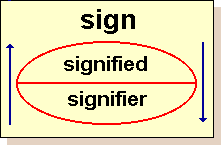
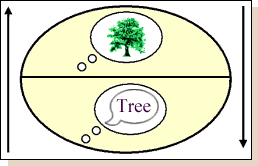

-Daniel Chandler, "Semiotics for Beginners," http://www.aber.ac.uk/media/Documents/S4B/sem02.html

Data Maps: Edward Tufte
Tufte's writing is important in such fields as information design and visual literacy, which deal with the visual communication of information. He coined the term "chartjunk" to refer to useless, non-informative, or information-obscuring elements of quantitative information displays. Tufte uses the term data-ink ratio and argues strongly against the inclusion of any non-informative decoration in visual presentations of quantitative information and claims that ink should only be used to convey significant data and aid in its interpretation.
-http://en.wikipedia.org/wiki/Edward_Tufte
To download the Tufte maps handout click here.

Psychogeography: Guy Debord
Situationist Guy Debord devised the notion of psychogeography in the 1950s. It deals with the study of the exact laws and specific effects of our geographic environment. Psychogeography describes the sudden change in atmosphere a few meters further along a street, and the different characteristics of city districts. It reveals the path of least resistance a person subconsciously takes when wandering aimlessly and points out the attraction or repulsion of particular places.

Imagine if you were walking in an unfamiliar area of town and suddenly you realized that it was very dark and the shadows looked distinctly unfriendly. But what if you had a map, a map that clearly marked out entire sections of the city as safe, or peaceful or even scary. Such a map would be dramatically different from normal maps, in that the data being presented is no longer merely objective, but also subjective. Welcome to the new world of psychogeography.

Psychogeography is an umbrella term used to refer to a number of different ways to explore cities and towns. This new field is still emerging and like any new genre there is still a sense of uncertainty. Most definitions hover around the issues of maps and people’s responses to urban spaces and surroundings. The most accessible one is as follows: Psychogeography is the hidden landscape of atmospheres, histories, actions and characters which charge environments. But there is a basic thread running through all the various versions of psychogeography, and that is the generation of maps. These are maps that challenge all preconceived notions about maps.

Psychogeographic maps present maps that may or may not be objective. A case in point is 'mental mapping'. These are maps generated by individuals walking along areas in the city and recording emotions. The resulting map is more than a physical record of distances travelled, it is also a record of the internal state of mind of the map maker.

Other kinds of mental maps include maps made from memory alone. Some maps even overlay several such mental maps and the final result is a unique perspective of hitherto familiar areas. The newness of this field also leads to widely differing methods of map making. By far the most commonly used method is something known as "Generative algorithms". This involves the establishing of a predetermined method of walking, and the psychogeographers follow such algorithms in order to explore the city in new ways. Typically, the rules for walking would involve just a series of instructions such as turn right, and then the second left, etc etc, and soon the participants would end up in places they would never have consciously chosen to go to.

Another example of this new way of walking is using a map of, say, City A, and follow it in City B. Or by randomly following a person on the street and observing the route he/ she takes. While these projects seem to push the boundaries of maps further, one is tempted to ask what use is it all? For this we have to wait and see. But for sure, the city will no longer be something that lies in-between their houses and offices, instead there is likely to be a renewed interest in the concept of being an urban dweller.

-Dinesh Rao

Artists's Mapping Projects

Mona Hatoum
Map, 1999, glass marbles
Map, 1998, glass marbles (Basel)
Precariously balanced, fragile yet potentially dangerous, Hatoum's work powerfully suggests the contingency that defines the geo-political landscape.

Mona Hatoum: "...the map was very fragile: as soon as one set foot on the parquet, the marbles on the floor started moving. At the same time, the work was very menacing. I like it when things are attractive and forbidding at the same time; both seductive and dangerous. The marbles made the floor hazardous, because you could slip on the glass balls and fall down. I've done quite a few works which destabilize the ground you walk on."

Hot Spot, 2006, stainless steel and neon tube
Hot Spot interrogates the notions of ‘boundaries’ through the depiction of a world map – an ongoing theme in the artist’s work. Hot Spot is a cage-like globe, approximately the size of a person’s height and arm span, which tilts at the same angle as the earth. Using delicate neon to outline the contours of the world on its surface, the work buzzes with an intense energy, bathing its surroundings in a luminescent red glow. Compelling and seemingly dangerous, Hot Spot suggests that it is not simply contested border zones that are political hot spots but an entire global situation: what Hatoum describes as a ‘world continually caught up in conflict and unrest’.

Brian Collier
Human Movement Patterns, 2002
"Tracking an individual's regular movements can be both uncomfortably intimate and frigidly anonymous. For this project I create a series of map-portraits based on several individual's habitual weekly travels. The appearance of scientific objectivity in the finished map-portraits works in direct opposition to the fact that I personally know all the individuals represented. Furthermore, the initial maps were made by those individuals themselves, rather than an outside observer. Most of the participants reported that this self-surveillance was slightly disturbing. There is an underlying intimacy, evoked only subtly, when the viewer notices the flesh-like quality of the hand-waxed paper or the use of only first names of participants."

Tuesday, June 26, 2007

Mapping Art + Design

Maps
Definition:
A map is a symbolized depiction of a space which highlights relations between components (objects, regions, themes) of that space.
Most usually a map is a two-dimensional, geometrically accurate representation of a three-dimensional space; e.g., a geographical map. However, computers and database systems have allowed for the growth of Geographic Information Systems, or GIS, which allow for dynamic, real-time interaction with geographic data. More generally, maps can be devised to represent any local property of the world or part of it, or any other space, such as the brain (see Brain mapping) or extra-terrestrial mapping.
-http://en.wikipedia.org/wiki/Map

Artist's Mapping Projects

Jasper Johns Map, 1961
"Whether or not we try to interpret this painting as a rethinking of America, we discover maps to be an interesting visual subject, because while they are themselves concrete objects, at the same time they are abstract representations of geographical and political boundaries, somewhat arbitrary organizations imposed on the land. A subtle but important conceptual issue arises here: has Johns painted a map or a painting of a map? We might think both, but he felt it was the former, that instead of trying simply to represent something, as most past painters have done, he painted the thing itself. Theoretically, we could use this map in a classroom as easily as another."
-Philip Yenawine, "How to Look at Modern Art"
Map
Map (B&W)
Other works

Nina Katchadourian

Kathy Prendergast, Lost Map
In describing “Lost Map” Prendergast writes: “For the last few years I have been researching place-names with the idea of producing an “Emotional Atlas of the World.” This atlas would show all the places in the world which have names connected with emotions, i.e., Lost Bay, Lonely Island, Hearts Desire, etc., rather than the conventional atlas which shows places of importance. “Lost Map” is a variation on this theme. Through Prendergast’s work, we may come to know every “lost” place in North America. -http://www.velocitymadegood.org/writing/writing_presentations_frame.html
more of Prendergast's work

Alighiero Boetti, Mappa del Mondo

Joyce Kozloff

GPS art
GPS artist Jeremy Wood's Meridian Project
A walk though London along the quote: “It is not down in any map; true places never are.” (from Herman Melville's Moby Dick)
more GPS drawings

Homework due June 28: Project 2: Mapping a LES Block


http://www.youngna.com/youngna/pages/040327_Octopus.htm

Project 2: Mapping a LES Block
With your group, visit Orchard, Essex, Ludlow and Grand streets on the LES. Choose one block on one of these streets to map, with each team member sketching a building in detail, and taking observational notes (building number, residential or business, etc.). Then, as a group, make a collage map with the notes and drawings to be presented in class on Thursday June 28.

1. Choose a block on Orchard, Essex, Ludlow or Grand streets.

2. Choose a building on the block to document and observe (each group member should choose a different building on the same block).

3. In your sketchbook record information about the building: write down the building's address, whether or not it is a residence or business, who you see going in or coming out of the building, and any other observations (graffiti, trees, plants, trash, anything else of interest).

4. Draw the building in your sketchbook or on larger paper. This can be a quick sketch, (a 'gesture drawing') or a longer drawing. You can also take photos, but you must have a drawing of some kind. Pay special attention to the architectural details (windows, doors, and decorative elements), these can be separate sketches.

5. As a group, combine your drawings and notes into one single collage "map" of your block.

6. Be prepared to talk about both the group's map and the building you chose in class.

Wednesday, May 30, 2007

How to reserve equipment

All reservations must be made online through the Newschool website. To reserve equipment (still digital cameras, video cameras, etc.), go to http://www.newschool.edu/at/. Under “Student Reservations” choose “Equipment Center” then sign out the equipment you need.

Location
55 West 13th St, Rm. 921

Hours
Monday - Thursday: 9am - 9pm
Friday: 9am - 7pm
CLOSED on Weekends, Holidays, Breaks & Intersessions

Contact
Tel: 212.229.5300 ext. 4556
Fax: 212.647.8202
Email: eqc@newschool.edu

Homework due June 26: Project 1: Analysis of Outdoor / Site-Specific Art in NYC

Project 1:
Observation and analysis of a site-specific art installation


Choose one of the 4 outdoor exhibits below to visit with your team.

1. Before you visit, research the artwork that you will be visiting. Look for:
-biographical information about the artist
-an artist’s statement of intent about the piece
-reviews of the artwork

2. Visit the artwork with your team.
-interact with the piece as an individual and as a group
-take visual notes (drawings, sketches, photos) and written notes about your experience in your sketchbook
-answer the following questions:
How does the piece/pieces make you feel?
How does the piece relate to its specific location and environment?
What senses does it effect?
Stand back and observe – how do others interact with the piece?
Think critically – note aspects of the piece that you think are ineffective. How would you improve it?

3. Be prepared to discuss your experiences in class on Tuesday.

EXHIBITS
Alexander Calder in New York
http://publicartfund.org/pafweb/projects/06/calder/calder-06.html
Location and Directions:
City Hall Park is located in Lower Manhattan, and is bordered by Broadway, Chambers Street, Centre Street, and Park Row. The nearest subway stations are A, C, E to Chambers Street; 4, 5, 6, J, M, Z to Brooklyn Bridge-City Hall; R, W to City Hall; 2, 3 to Park Place.

Damián Ortega's Obelisco Transportable
http://www.publicartfund.org/pafweb/projects/07/ortega/ortega-07.html
Location and Directions:
Obelisco Transportable is on view at 60th Street and Fifth Avenue, at the entrance to Central Park. Subways: N, R to Fifth Avenue; 4, 5, 6 to 59th St/Lexington Ave. The work is free to the public and is on view daily.

Beth Campbell's Potential Store Fronts
http://www.publicartfund.org/pafweb/projects/07/campbell/campbell-07.html
Location and Directions:
Potential Store Fronts is on view at 125 Maiden Lane between Pearl and Water Streets in Lower Manhattan. This exhibition is free and open to the public at all times. Subways: 2, 3 to Wall Street; J, M, Z to Broad Street; 4, 5 to Wall Street.

L.I.C., NYC
http://www.socratessculpturepark.org
Location and Directions:
The Park is located in Long Island City, Queens at the intersection of Broadway and Vernon Boulevard. Subways: Monday through Friday take the N or W train to the Broadway stop in Queens and walk eight blocks along Broadway toward the East River. On Saturday and Sunday take the N train to the Broadway stop.

Wednesday, May 9, 2007

Welcome to SOPIS 2007

This is the blog for Norene Leddy's summer 2007 SOPIS class, section C.

To download the syllabus, click here.

To download the questionnaire, click here.

To download the blogging handout, click here.

To download the homework handout, click here.

If you have any questions, you can email me at Parsons: leddyn@newschool.edu. You can also reach me via the Pre-Enrollment office: 212.229.8925.